All the great things are simple, and many can be expressed in a single word: freedom, justice, honor, duty, mercy, hope.
Winston Churchill
From Brainy Quote
Link: https://www.brainyquote.com/quotes/winston_churchill_156910
All the great things are simple, and many can be expressed in a single word: freedom, justice, honor, duty, mercy, hope.
Winston Churchill
From Brainy Quote
Link: https://www.brainyquote.com/quotes/winston_churchill_156910
If you want to see your CPU Usage and you’re on Windows 10, you’re in luck! This How To will give you two diffrent ways to see the CPU usage without installing anything!
NOTE: You must be on the latest release of Windows 10 for this to work. This also might work on Windows 8/8.1
Task Manager is a app hidden within Windows 10. This is how to access it:
1. Press Ctrl-Alt-Delete. You will be presented with a menu. Click on Task Manager.
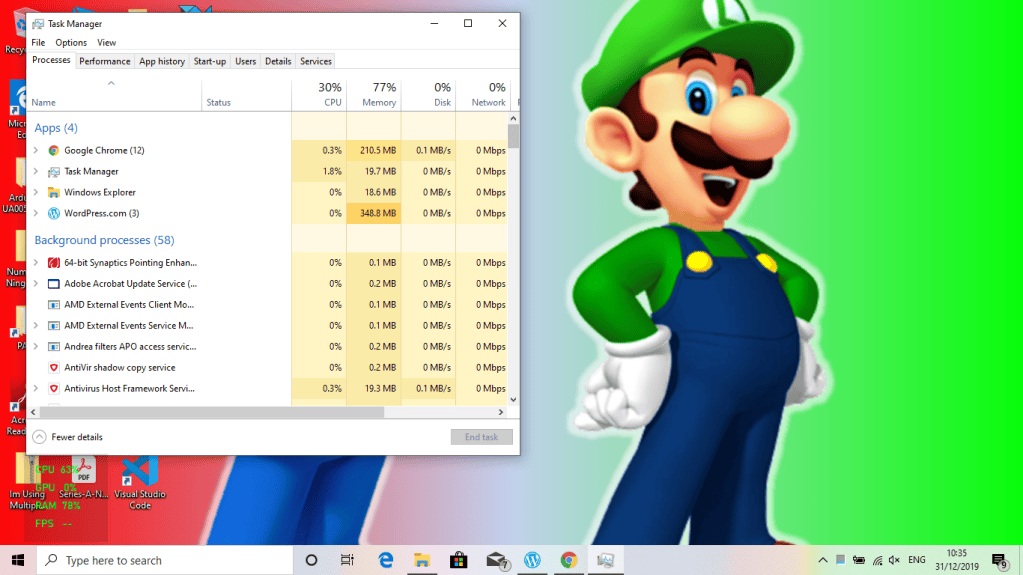
2. Click on Peformance tab. And that’s your CPU Usage!
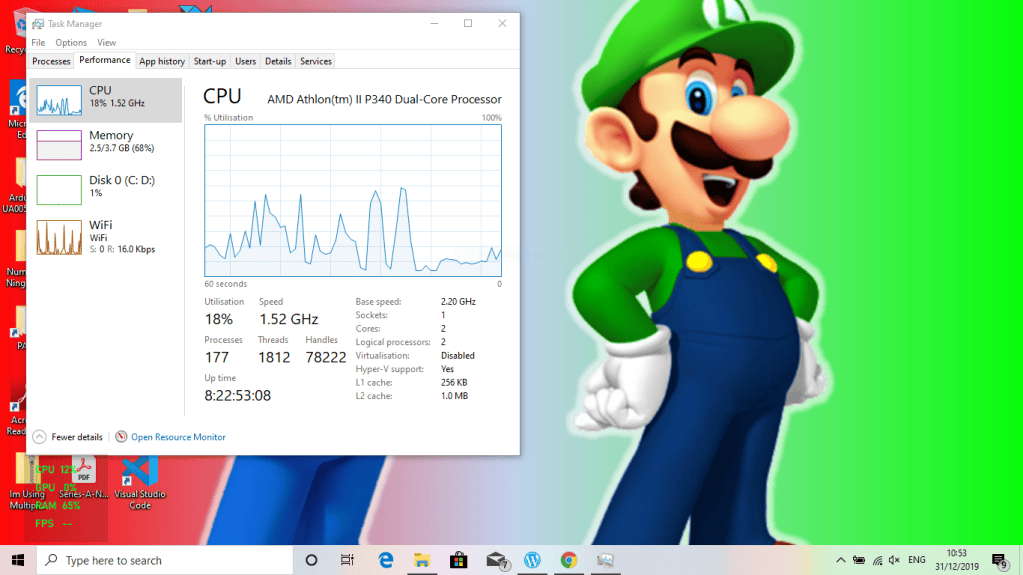
The Game Bar is a tool that you can use for games. But it can also be used for seeing CPU Usage!
1. Click Windows Key-G. The Game Bar will open.

2. Click the computer icon (circled below)

3. In the bottom-left corner, there will be a CPU Usage Graph. That’s it! Click Windows Key-G to exit.
Hope you enjoyed reading this and I hope it solved your problem! Bye!
Hey guys, and welcome to Computer O Code Blog! The original name was The Blog Of Computing, but I changed it to fit in with my free domain computer0.code.blog (the 0 is a O). I cannot wait to post some new blogs! This might have some example posts/comments, but I am removing them!
Subscribe to get emails on new blogs (we will NOT spam you). If you are the computer or coding guy, this place is ze BEST for you!
Can’t think how to get started? Just write the first thing that pops into your head. Anne Lamott, author of a book on writing we love, says that you need to give yourself permission to write a “crappy first draft”. Anne makes a great point — just start writing, and worry about editing it later.
When you’re ready to publish, give your post three to five tags that describe your blog’s focus — writing, photography, fiction, parenting, food, cars, movies, sports, whatever. These tags will help others who care about your topics find you in the Reader. Make sure one of the tags is “zerotohero,” so other new bloggers can find you, too.
Have a WordPress.com account? Log in now.

